
Download Spy Camera PRO APK – spy camera, hidden camera, covert photography, surveillance tool, discreet recording, Android app, face detection, continuous capture, mobile surveillance
Overview
Spy Camera PRO is a mobile application designed for discreet image and video capture on Android devices. The software enables users to take photos and record videos without triggering audible cues or visible flashes, making it suitable for situations requiring covert operation. It integrates directly into the device’s main screen, allowing seamless access to camera functions without drawing attention.
The app supports both front and rear-facing cameras, offering flexibility in positioning and usage. It includes automated capture features such as continuous shooting mode and face detection triggering, which can be useful in surveillance scenarios where manual activation is impractical. While the software is marketed for both personal and professional use, the developer emphasizes that it should not be used for illegal purposes.
Target users may include individuals seeking privacy monitoring in personal spaces or professionals involved in security-related tasks. However, the app’s functionality raises ethical and legal considerations, particularly in contexts involving unauthorized observation. Real-world applications could include monitoring children’s safety, verifying home security, or supporting investigative work under lawful conditions. The developer did not provide additional information about the organization or its background.
Key Features & Capabilities
- Covert Photography: Capture images silently without camera shutter sounds or flash activation, ideal for discreet observation.
- Discreet Recording: Record video without visual or audio indicators, enabling uninterrupted surveillance.
- Face Detection Trigger: Automatically takes photos when a face is detected, reducing the need for constant manual monitoring.
- Continuous Capture Mode: Enables rapid, back-to-back image capture, useful for tracking movement or capturing dynamic scenes.
- Multi-Camera Support: Switch between front and rear cameras seamlessly, depending on the surveillance setup.
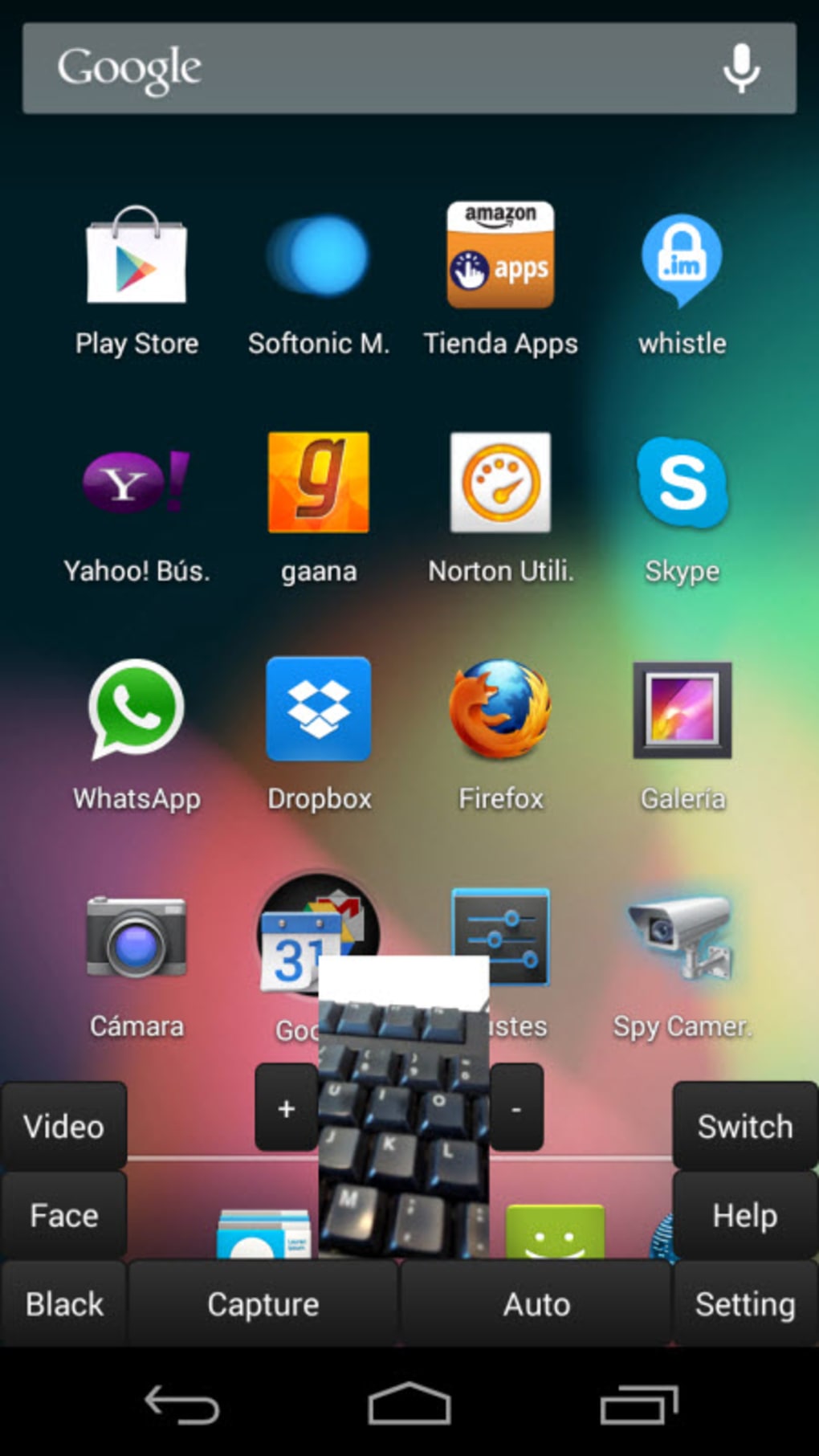
- Hidden Interface: Integrated into the main screen, minimizing the appearance of a separate camera application.
These features are designed to support scenarios where visibility of the recording device must be avoided. For example, a parent might use face detection to capture moments when a child enters a room, or a professional might use continuous capture during a site inspection. The app’s silent operation ensures that subjects remain unaware of being recorded, which is critical in covert operations. However, users must ensure compliance with local laws regarding privacy and surveillance.
User Interface, Workflow & Performance
The user interface of Spy Camera PRO is designed to be minimal and unobtrusive. It operates as a background overlay, blending into the device’s main screen to avoid suspicion. Navigation is streamlined, with key functions accessible through simple gestures or hidden triggers, reducing the time needed to initiate recording or capture.
Workflow efficiency is enhanced by automated features like face detection and continuous capture, which reduce the need for constant user input. The app runs in the background, allowing users to perform other tasks while maintaining surveillance. However, exact performance details such as CPU usage, RAM consumption, or battery impact were not specified by the developer.
Stability observations are based on general software behavior patterns. The app is expected to maintain consistent operation during extended recording sessions, though prolonged use may affect device performance depending on hardware. The developer did not provide information on crash rates or error handling mechanisms. Users should monitor device behavior during extended use and ensure the app is not interfering with other system functions.
Compatibility & System Requirements
Spy Camera PRO is designed for Android operating systems. The current version is 1.2.0, with a file size of 12.5 MB, indicating a lightweight installation. The app is intended for use on mobile devices with standard camera hardware.
Exact system requirements were not listed by the developer. Compatibility with specific Android versions or device models was not confirmed. Users should verify that their device supports both front and rear camera functionality, as well as background app execution. The developer did not specify whether root access or special permissions are required for full operation.
Installation is straightforward, but users should ensure they are downloading from a trusted source, especially when using APK files. The app’s performance may vary across different hardware configurations, particularly in older or low-memory devices.
Pros and Cons
Pros
- Discreet operation with no shutter sounds or flash
- Supports both front and rear cameras
- Face detection and continuous capture automation
- Lightweight size (12.5 MB)
- Hidden interface minimizes visibility
Cons
- No official system requirements provided
- Performance impact on device resources not disclosed
- Potential legal and ethical concerns in unauthorized use
- Requires trust in the source for APK downloads
- Limited transparency about data handling and storage
FAQ Section
Is Spy Camera PRO compatible with all Android devices?
Compatibility information was partially provided. The app is designed for Android, but specific device or OS version requirements were not listed. Users should ensure their device has functional front and rear cameras and supports background app execution.
Is the app safe to use on my Android device?
The app is available as an APK, which means it is not distributed through official app stores. Users should only download from trusted sources to avoid malware. The developer did not provide security certifications or privacy policies.
Does Spy Camera PRO require root access?
The developer did not specify whether root access is required. The app may function on standard Android devices, but certain features might need elevated permissions depending on the device’s security settings.
Can I update the app after installation?
Updates are available through the developer’s distribution channel. Users should check the official source for the latest version to ensure access to new features and security patches.
Is the app suitable for professional surveillance use?
While the app is designed for both private and professional purposes, its use in professional contexts must comply with local privacy laws. The developer explicitly states that the app is not intended for illegal use.
Final Thoughts
Spy Camera PRO offers a suite of tools tailored for discreet image and video capture on Android devices. Its silent operation, automated features, and hidden interface make it a viable option for users seeking covert monitoring solutions. The lightweight design and support for multiple camera modes enhance its practicality across various scenarios.
However, users must exercise caution due to the app’s potential for misuse and the lack of transparency in system requirements and data handling. Legal and ethical considerations are paramount when using such tools. For individuals needing a reliable, low-profile surveillance solution, Spy Camera PRO presents a compelling option—provided it is used responsibly and within the bounds of the law.
Download Spy Camera PRO now






.png)
